
Free Invoice Generator vs Invoicing Software: Which Do Freelancers Actually Need?
Search for how to send your first invoice and you will mostly find accounting software free trials. That makes sense for the companies paying for those ads. It makes less sense for a designer with three clients, who will be paying a monthly fee to send about three PDFs a month. Here is how a free invoice generator and paid invoicing software really compare, with the point at which paying starts to make sense.
What each one actually is
A free invoice generator is a form that produces a professional PDF. A good one also remembers your details, numbers invoices for you, and tracks which ones are paid. The EazyTools4u Invoice Generator runs in your browser and saves invoices locally, with no account.
Invoicing software, such as QuickBooks, FreshBooks, Xero and their competitors, is a bookkeeping system that happens to send invoices. You pay monthly for the parts that a PDF can't do: card payments, bank feeds, automatic reminders, multi-user access, and reports your accountant can work with.
Neither one is better in general. They solve different problems, and the question is which problem you have this year.
The number that settles it: cost per invoice
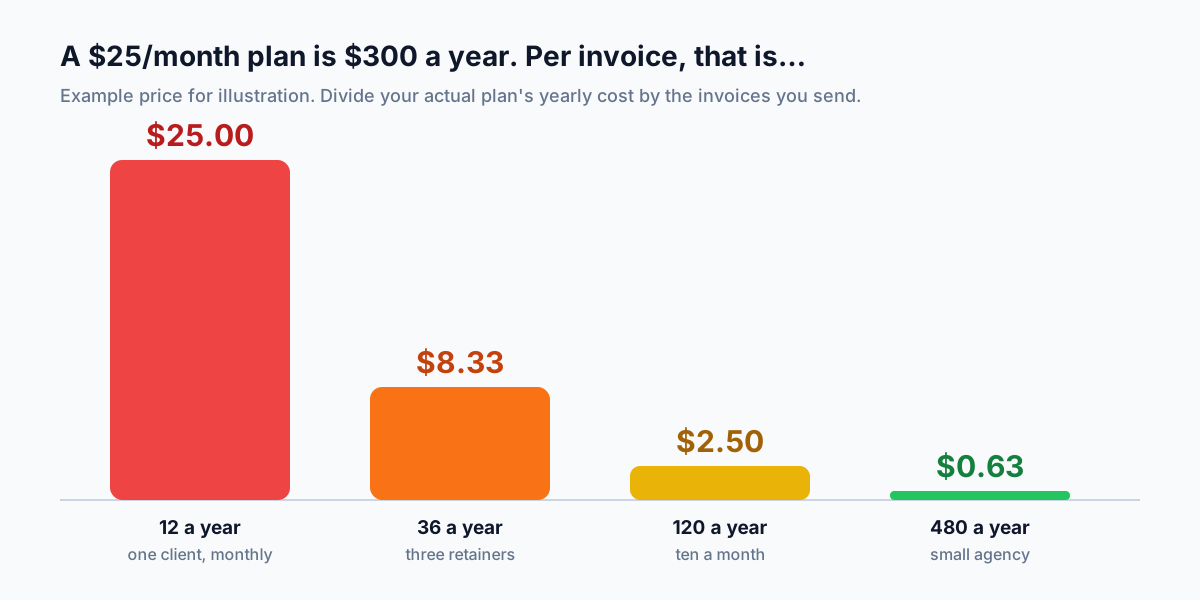
Paid plans for solo users commonly land somewhere between $15 and $40 a month, depending on the vendor and how long the introductory discount lasts. Check current pricing yourself. For round numbers, call it $25 a month, or $300 a year.
Now divide by the invoices you actually send. A freelancer with one monthly retainer sends 12 a year, so each invoice costs $25 to issue. Three retainers bring it to $8.33. At ten a month it's $2.50, and a small agency sending 40 a month is down to about 63 cents.
That's the honest answer to "do I need invoicing software?" At low volume you are paying for automation you don't use. At high volume, the subscription costs less than the hours it saves you on reminders and reconciliation.
What a free generator does well
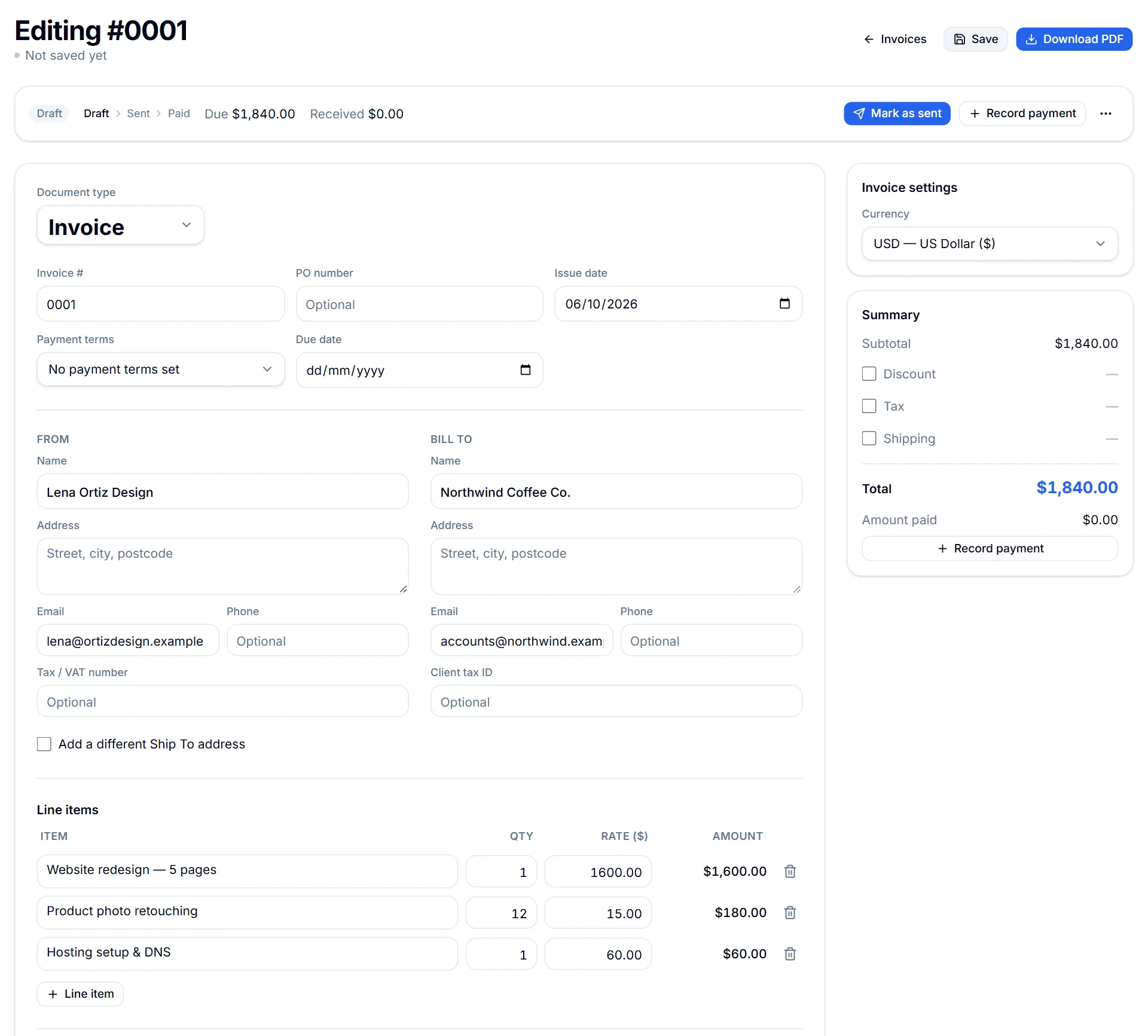
For most early-stage freelancers the needs are simple: a clean, correct PDF with a proper invoice number, due date and tax line, sent quickly. A browser-based generator does that in about five minutes, the first time, without a setup wizard asking about your chart of accounts.
The EazyTools4u Invoice Generator covers more than most people expect: around 26 currencies, discount, tax and shipping lines, PO numbers, payment terms, and a separate ship-to address. Once an invoice is saved, you can mark it as sent, record full or partial payments, duplicate it for next month, and add the due date to your calendar.
Privacy is the underrated part. Client names, addresses and rates stay in your browser's storage instead of on a vendor's server, which is handy if a client contract restricts where their details are kept.
Where a free generator falls short
Don't pretend the gaps aren't there. They are the reasons people upgrade.
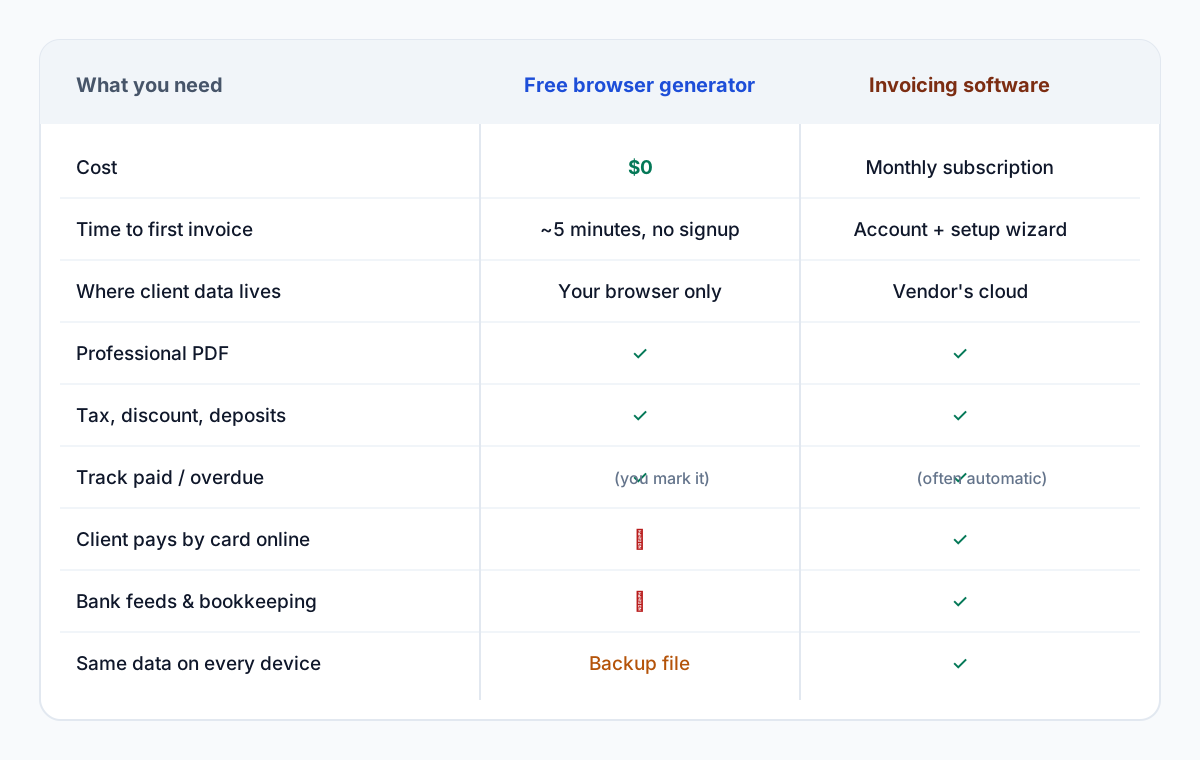
- No "Pay now" button. Clients pay by bank transfer or however you've arranged it, and you record the payment yourself.
- No bank feed. Nothing matches incoming payments to invoices automatically.
- One browser, one copy. Your data lives on the device you created it on. A backup file moves it, but it doesn't sync on its own.
- No accountant login. At tax time you export, rather than invite someone in.
- Reminders draft the follow-up email for you, but it opens in your own mail app and you press send.
Seeing the whole picture without a subscription
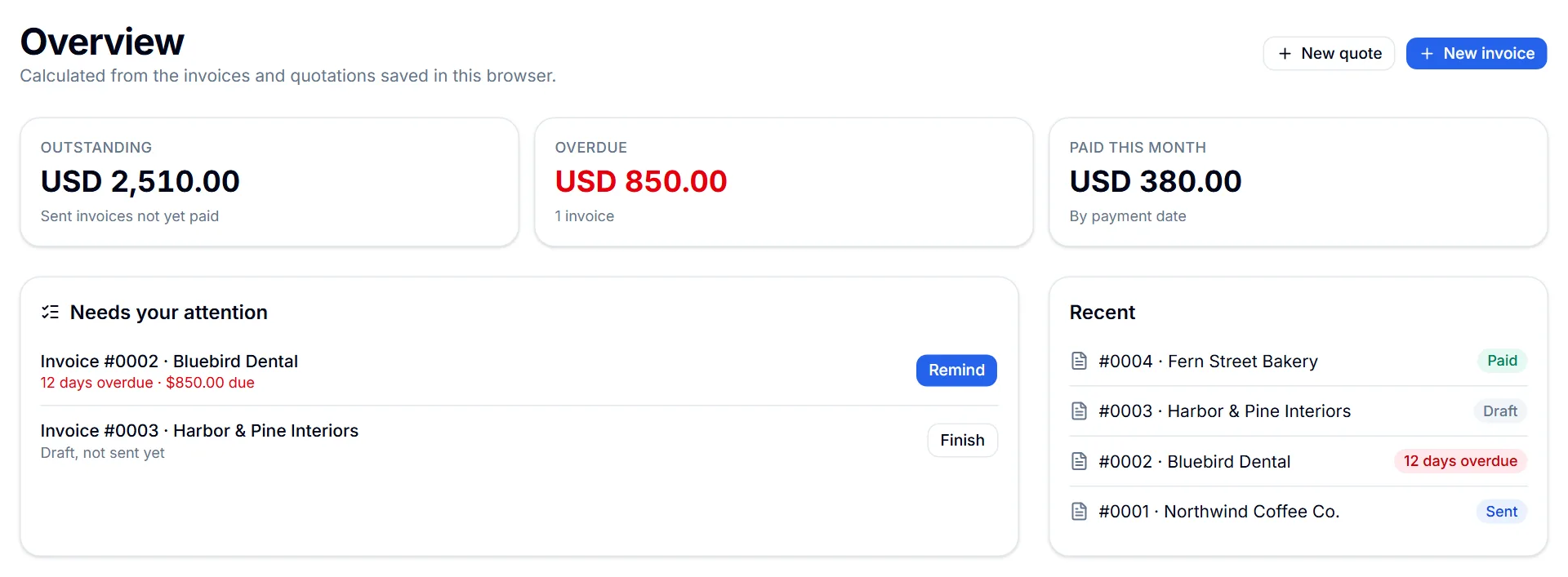
The thing most people miss when they leave spreadsheets behind isn't invoicing, it's the overview: what's outstanding, what's overdue, and what came in this month. The free Studio overview builds that from invoices and quotations saved in your browser. It shows money cards for outstanding, overdue and paid, plus a short list of what needs attention, like an overdue invoice to chase or a draft you never sent.
It won't reconcile your bank account, but for a solo business it answers the Monday-morning question "who owes me what?" Then back up the data from Studio settings now and then, so a cleared browser doesn't take your records with it.
When to switch: four questions
Answer these honestly. If every answer is no, keep the subscription money. If any answer is yes, that feature is what you'd be paying for, and it's probably worth it.
Switching later is painless if you keep your numbering tidy now. Carry your last invoice number into the new system so the sequence continues, and keep your exported PDFs. That's all an accountant needs from your free-tool era.
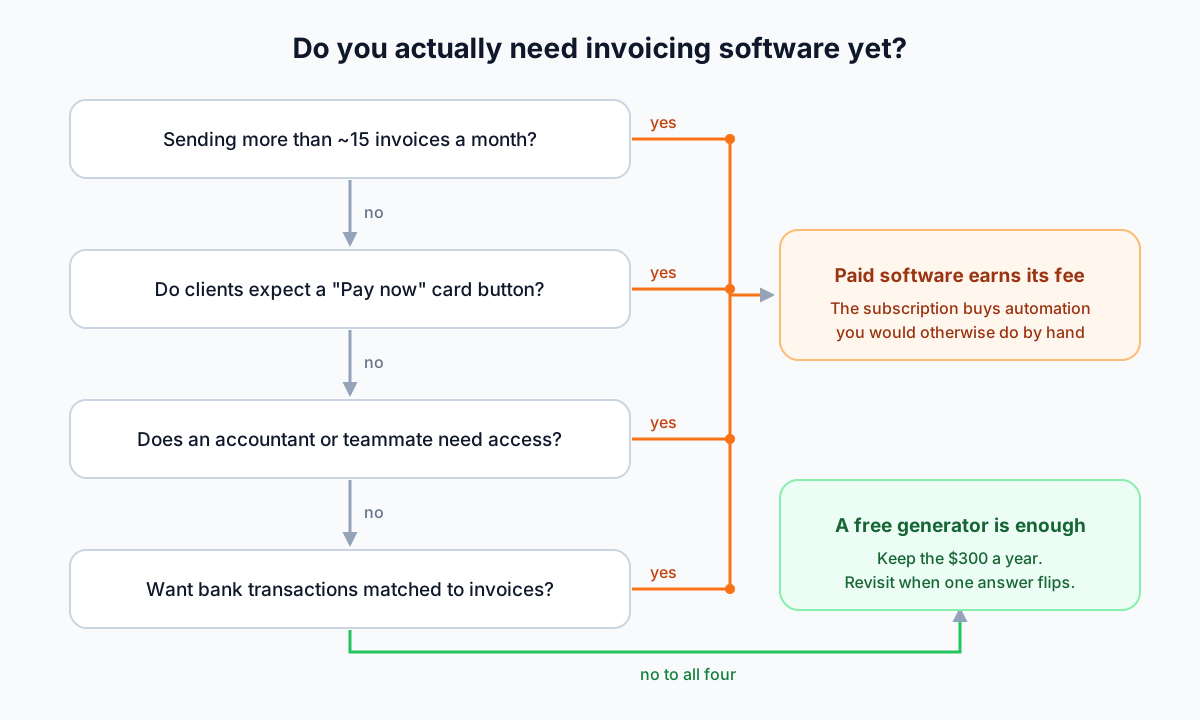
- Do you send more than about 15 invoices a month?
- Do clients expect to pay by card from a link in the invoice?
- Does an accountant, bookkeeper or teammate need their own access?
- Do you want bank transactions matched to invoices automatically?
Key takeaways
- Divide a plan's yearly cost by the invoices you send. At low volume, software is an expensive PDF printer.
- Pay for software when you need card payments, bank matching, shared access or real volume, not before.
- A browser-based generator keeps client data on your device; back it up regularly.
- Keep invoice numbering continuous so switching later is painless.
Try the related tool
Put this guide into practice with a free, private browser tool — no signup.
Invoice GeneratorFrequently Asked Questions
Is an invoice from a free generator legally valid?
Yes. Validity depends on what the invoice contains (seller and buyer details, a unique number, dates, amounts and any required tax details), not on the software that produced it.
Can I move from a free invoice generator to QuickBooks or Xero later?
Yes. Continue your invoice numbering in the new system and keep the PDFs you already issued. Most people don't import old invoices at all; they start fresh from the next number.
Where are invoices stored in the EazyTools4u generator?
In your browser's local storage (IndexedDB) on that device. Nothing is uploaded. Use the backup export in Studio settings to keep a copy or move to another computer.
Does a free generator handle tax and deposits?
The Invoice Generator supports tax as a percentage or flat amount, discounts and shipping. For deposits, create a quotation with a deposit amount and convert it to an invoice when the client accepts.