
10 Free Online Tools for Developers (and the Terminal One-Liner for Each)
None of these are hard. A 401 that turns out to be an expired token. An API response squashed onto one line. A 1700000000 in a log that you need as a date. Each takes thirty seconds, and each pulls you out of the code you were actually writing. Here are ten of those chores, the free browser tool that does each one, and the terminal one-liner for when you'd rather not leave the shell. Each one also comes with the gotcha that has cost someone an afternoon.
Before you paste anything: where does it go?
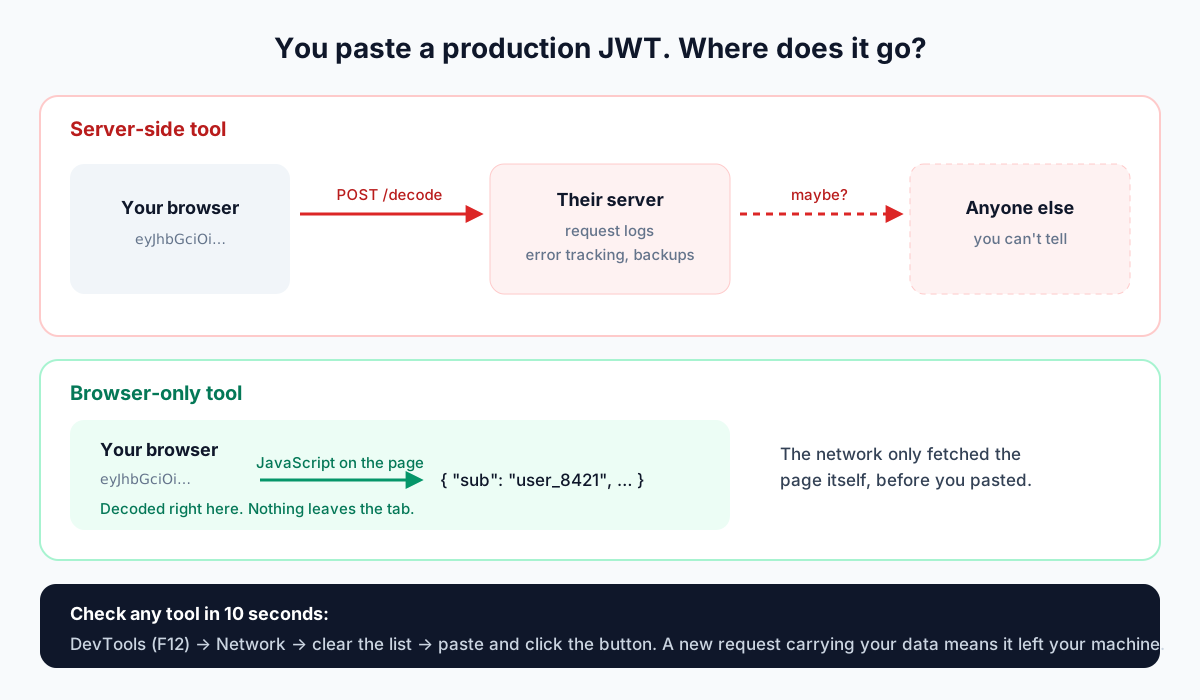
Developers paste things into online tools they'd never paste into a chat: production tokens, customer API responses, connection strings. Some of those tools send what you paste to a server to process it. Then it sits in somebody's request logs, error tracker or backups, and you have no way to know who else can see it.
Every tool in this list runs in your browser. The decoding, hashing and diffing happen in JavaScript on the page, and nothing you type is sent anywhere. But don't take a website's word for it, ours included. You can check any tool in about ten seconds.
1. Decode a JWT when the API says 401
The request worked yesterday. Today it's a 401 and the response body says nothing useful. Nine times out of ten the token is fine apart from one claim: it expired, the audience is wrong, or the issuer belongs to a different environment.
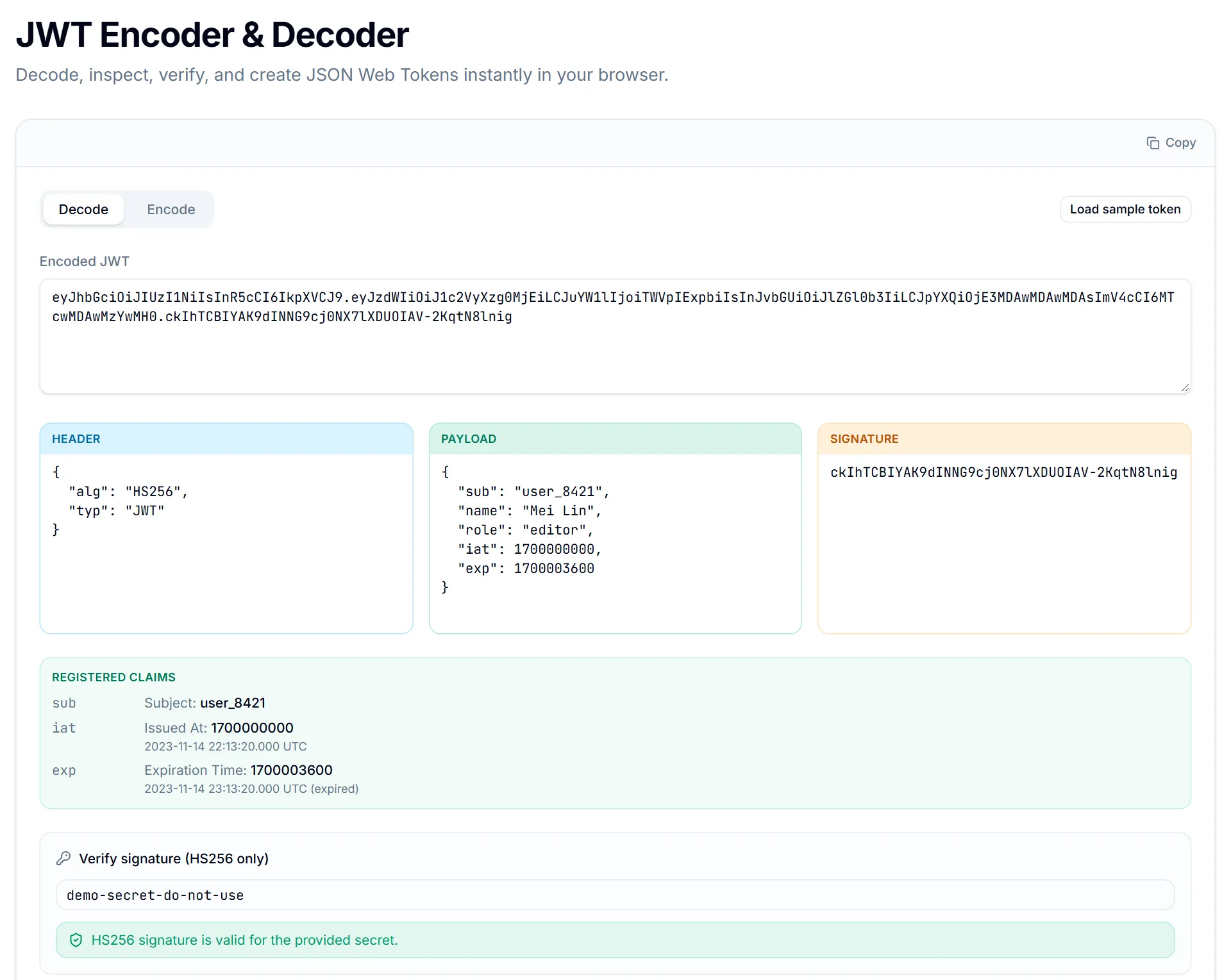
Paste the token into the JWT Decoder (a leading "Bearer " is stripped for you). It splits the token into header, payload and signature, and turns exp, iat and nbf into real UTC dates. It also tells you whether exp has passed. If you have the HS256 secret, it can check the signature too. In the screenshot below the signature is valid and the token is still rejected, because it expired an hour after it was issued.
Why anyone holding a JWT can read it
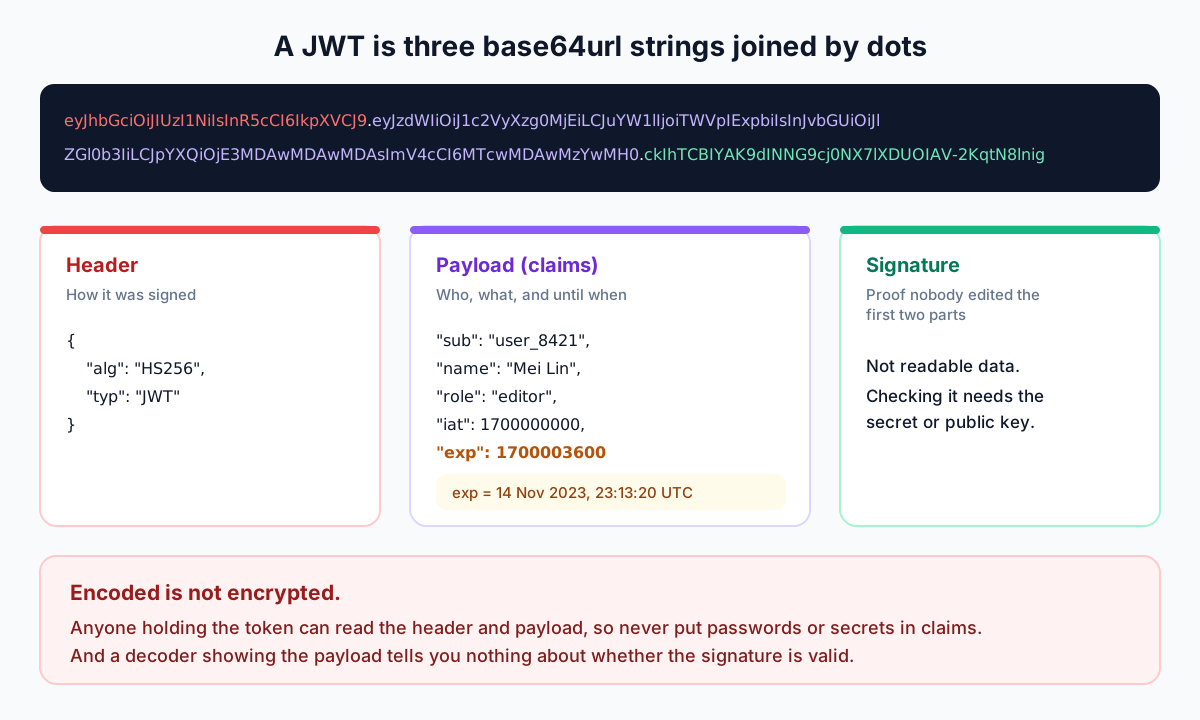
A JWT looks like noise, but it's three base64url strings joined by dots. The header and payload are plain JSON once decoded. The signature proves nobody changed them; it doesn't hide them. That's why claims must never contain secrets, and why the paste-anywhere habit matters more for JWTs than for most strings.
You can decode the payload in a terminal, but it's fiddly. JWTs strip the = padding and use - and _ instead of + and /, so the standard base64 command often prints the JSON and then complains.
cut -d. -f2 <<< "$TOKEN" | base64 -d
# {"sub":"user_8421","name":"Mei Lin",...,"exp":1700003600}base64: invalid input2. Read an API response that arrived on one line
curl gives you 40 KB of minified JSON, and somewhere inside it a field is missing. Paste it into the JSON Formatter and you get two-space indentation you can actually scan. If the JSON is broken, it tells you the line and column where parsing stopped.
In the terminal, jq is the standard tool, but it isn't installed by default everywhere. Node almost always is.
jq . response.json

# no jq? Node can do it
node -e "console.log(JSON.stringify(JSON.parse(require('fs').readFileSync(0,'utf8')),null,2))" < response.json3. Turn a Unix timestamp from a log into a date
Logs, JWTs and database rows love epoch seconds. 1700000000 is 14 November 2023 at 22:13:20 UTC, which nobody can work out in their head. The Timestamp Converter goes both ways, in seconds or milliseconds, and shows UTC next to your local time, which is where most off-by-a-few-hours bugs come from.
date -u -d @1700000000          # Linux (GNU date)
date -u -r 1700000000           # macOS (BSD date)
[DateTimeOffset]::FromUnixTimeSeconds(1700000000) # PowerShell4. Test a regex before it goes anywhere near production
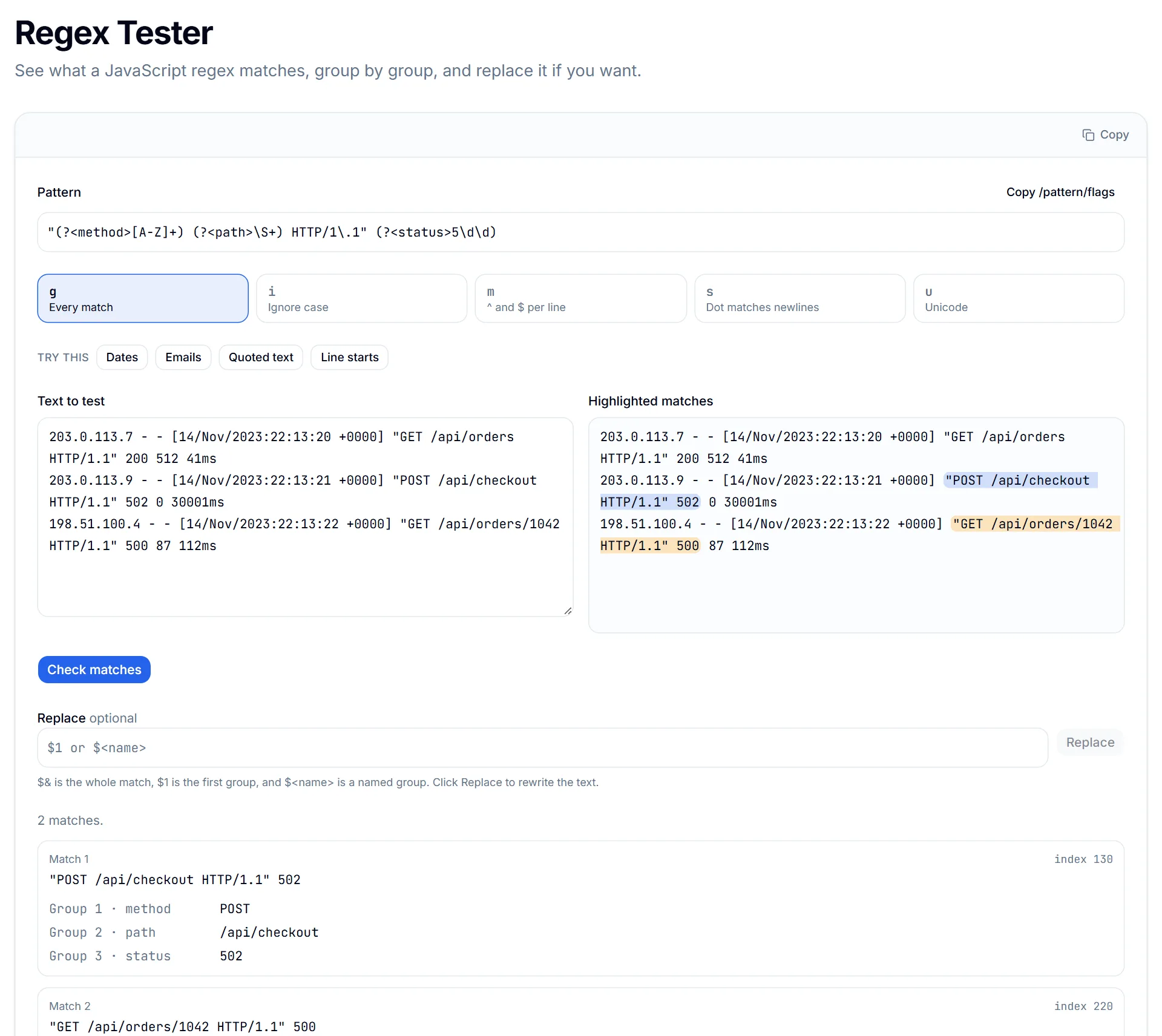
You want every 5xx from an access log, with the method and path. The Regex Tester runs JavaScript regex with the g, i, m, s and u flags, highlights each match, and lists every capture group by name. In replace mode you can rewrite the text with $1 or $<name>, which helps when you're building a cleanup script.
A pattern that's subtly wrong usually doesn't fail. It just matches slightly too much or too little, and you only notice later. Seeing every match highlighted against real log lines catches that before you ship.
grep -E '" 5[0-9]{2} ' access.log5. Compare two config files or API responses
Staging works and production doesn't, and the .env files look identical. Paste both into Text Diff and the two lines that differ light up side by side, with a count of added, removed and unchanged lines.
Text Diff compares line 1 with line 1, line 2 with line 2, which is ideal for configs and responses that share a shape. If a line has been inserted in the middle, use File Diff instead. It aligns lines the way an IDE does, offers side-by-side or unified view, and handles files up to 2 MB.

diff -u staging.env production.env
-DEBUG=false
-API_URL=https://api.example.com
+DEBUG=true
+API_URL=https://staging.example.com
6. Base64-encode a secret (without the newline)
Basic auth headers, Kubernetes Secrets and data URIs all want Base64. The Base64 tool encodes and decodes UTF-8 text in either direction. For images, there's a separate Image to Base64 tool.
The terminal version has a classic trap, and it has broken a lot of deployments.
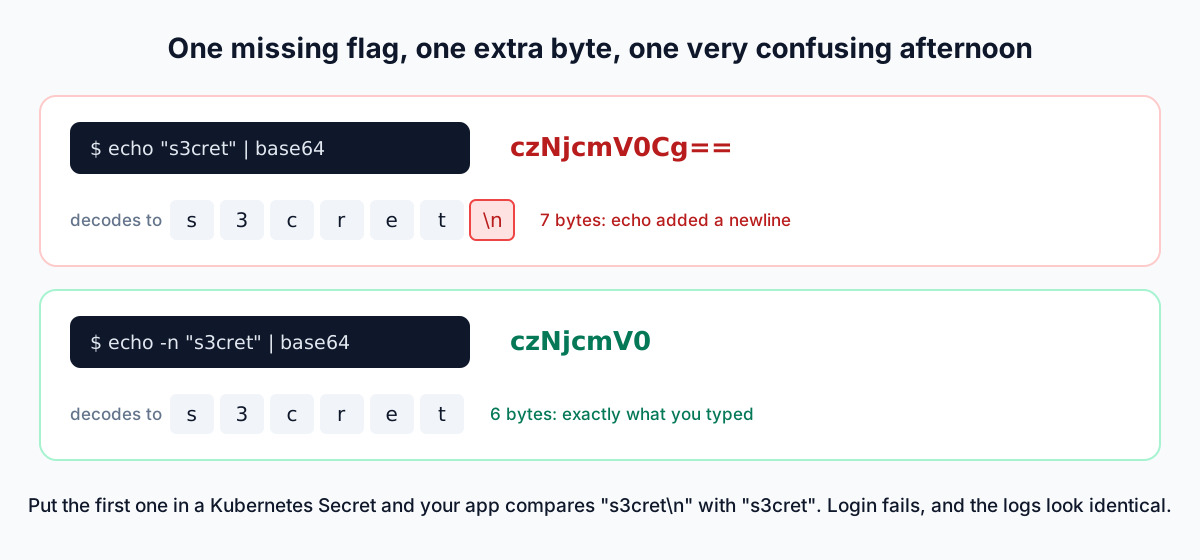
echo "s3cret" | base64        # czNjcmV0Cg==  (includes a newline)
echo -n "s3cret" | base64     # czNjcmV0
printf '%s' "s3cret" | base64 # czNjcmV0 (works the same everywhere)7. URL-encode a query value
A search for "Tom & Jerry" reaches your API as a search for "Tom ", plus a mystery parameter. The & was never encoded, so the server took it as the start of the next parameter.
URL Encode/Decode has two modes for the two different jobs. "Encode Component" is for a single value, and it escapes & = ? / and spaces. "Encode Full URL" is for a whole address. It deliberately leaves those characters alone, because they hold the URL together.
node -p "encodeURIComponent('Tom & Jerry')"
# Tom%20%26%20Jerry   <- correct for a value
node -p "encodeURI('https://x.dev/search?q=Tom & Jerry')"
# https://x.dev/search?q=Tom%20&%20Jerry <- & left as-is8. Generate UUIDs for test data
Seed scripts, fixtures and Postman collections all need IDs that don't collide. The UUID Generator creates random v4 UUIDs, from one to 10,000 at a time, ready to paste into a SQL insert or a JSON fixture.
uuidgen                                     # macOS / Linux (macOS prints UPPERCASE)
node -e "console.log(crypto.randomUUID())"   # anywhere Node is installed
[guid]::NewGuid() # PowerShell9. Check a download's checksum (or hash a string)
The release page lists a SHA-256 next to the file, and you want to know the file you downloaded matches it. Drop the file into the Hash Generator's File mode and it computes 18 algorithms at once, from MD5 and SHA-256 to SHA-3 and BLAKE2, in lowercase hex, uppercase hex or Base64. The file never leaves your machine, which matters when the thing you're checking is a private build.
sha256sum release.zip                       # Linux / Git Bash
shasum -a 256 release.zip                   # macOS
Get-FileHash release.zip -Algorithm SHA256 # PowerShell (prints UPPERCASE)10. Convert snake_case to camelCase
Your database says created_at and user_id, and your frontend wants createdAt and userId. The Case Converter turns text into camelCase, PascalCase, snake_case, kebab-case, Title Case, Sentence case, UPPERCASE or lowercase in one click. That's handy when renaming a block of fields for a TypeScript interface.
This is the one chore without a clean, portable one-liner. GNU sed can do it, macOS sed can't, and nobody remembers the syntax.
echo "created_at user_id is_active" | sed -E 's/_([a-z])/\U\1/g'
# createdAt userId isActive
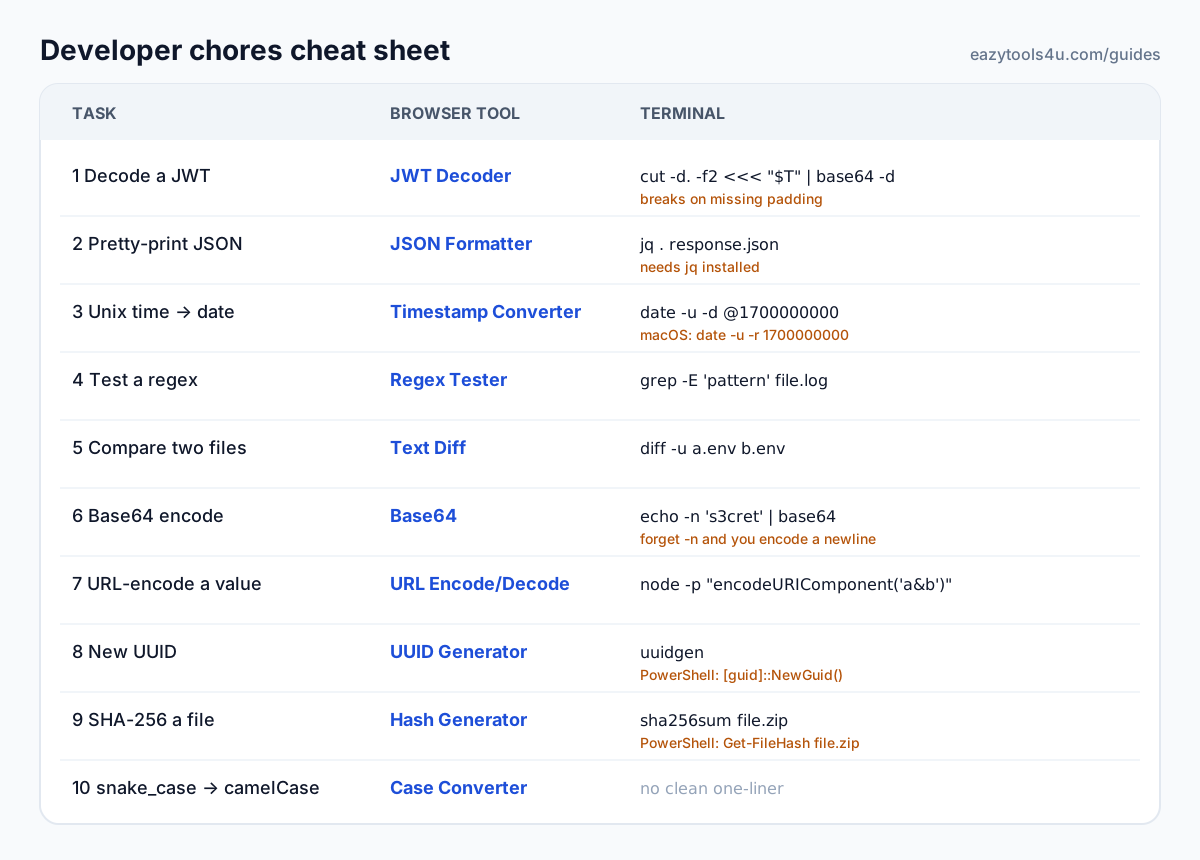
The whole list on one card
Bookmark the tools you'll use, keep the one-liners for when you're already in a terminal, and remember the four traps worth remembering: base64 padding in JWTs, seconds versus milliseconds, the newline echo adds, and \d in grep.
Key takeaways
- Check where pasted data goes before you trust any online tool. The DevTools Network tab answers it in seconds.
- Most 401s are a claim problem, usually an expired exp. Decode before you debug.
- Count timestamp digits: 10 is seconds, 13 is milliseconds.
- echo adds a newline. Use echo -n or printf before base64 or a hash.
- Encode query values with encodeURIComponent, never the finished URL.
Try the related tool
Put this guide into practice with a free, private browser tool — no signup.
JWT DecoderFrequently Asked Questions
Is it safe to paste a JWT or API key into an online tool?
Only if the tool runs entirely in your browser. Check by opening DevTools, going to the Network tab and pasting: if a request carrying your data appears, it left your machine. All ten tools in this list process input locally.
Can a JWT decoder tell me whether a token is valid?
Decoding only reads the header and payload. Validity also needs the signature checked with the right key, plus exp, nbf, audience and issuer checks. The JWT Decoder can verify HS256 signatures if you provide the secret; other algorithms must be verified by your server.
Why does my regex work in the tester but not in grep?
Different regex flavours. The Regex Tester uses JavaScript regex; grep -E uses POSIX extended regex, which has no \d, \w or lookarounds. Replace \d with [0-9], or use a tool with the same flavour as where the pattern will run.
Do I need to sign up to use these tools?
No. There are no accounts and nothing to install. Open the page and use it.