
JSON vs XML: Key Differences, Formatting, and Converting Between Them
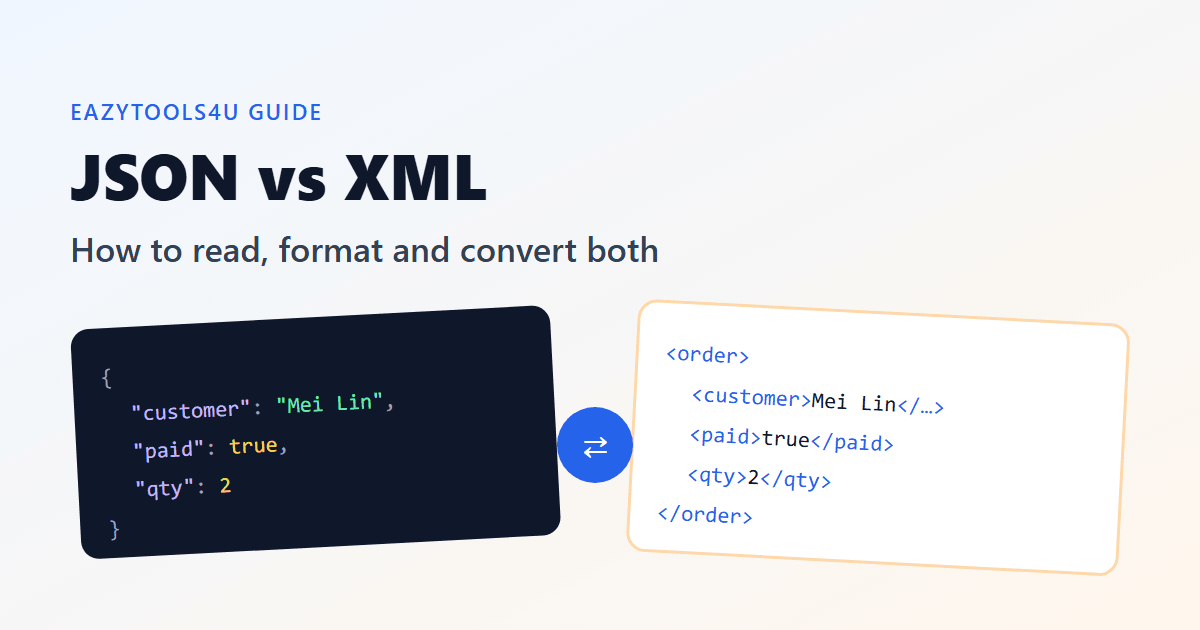
An API hands you 40 KB on a single line. A partner's system only accepts XML. A config file refuses to load and the error says something about position 2417. That is how most people meet JSON and XML: not as a design decision, but as a mess to clean up before lunch. Here is what actually differs between the two, how formatting finds the broken bit for you, and where conversions quietly go wrong.
Same data, two dialects
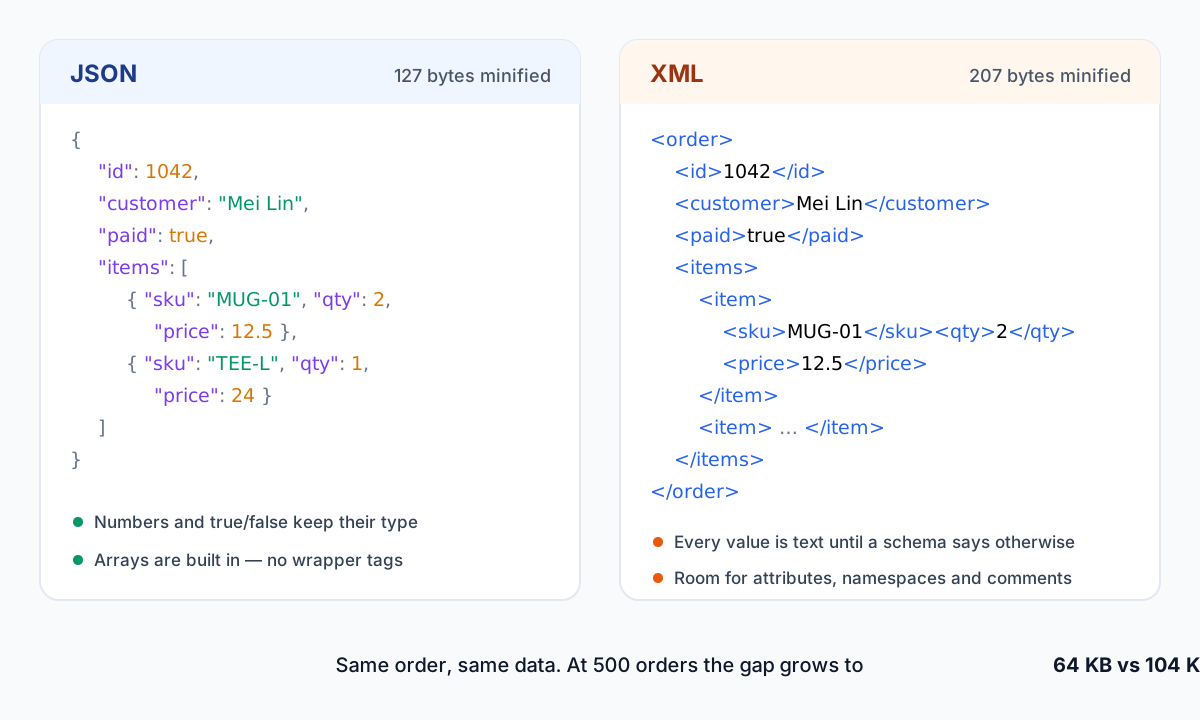
Take one small online order: an ID, a customer, a paid flag and two line items. Written as minified JSON it is 127 bytes. The same order as XML, one element per field, is 207 bytes. Scale it to 500 orders and you are looking at 64 KB against 104 KB.
The bigger difference is not size, it is types. JSON knows six things: strings, numbers, true/false, null, objects and arrays. When it says "qty": 2, that 2 is a number. XML only knows elements, attributes and text, so <qty>2</qty> is the character "2" until a schema or your own code decides otherwise.
XML gives you things JSON simply doesn't have: attributes, namespaces, comments, and mixed content like a paragraph with a bold word in the middle. That is why documents, feeds and enterprise formats kept it while web APIs moved on.
You rarely get to choose
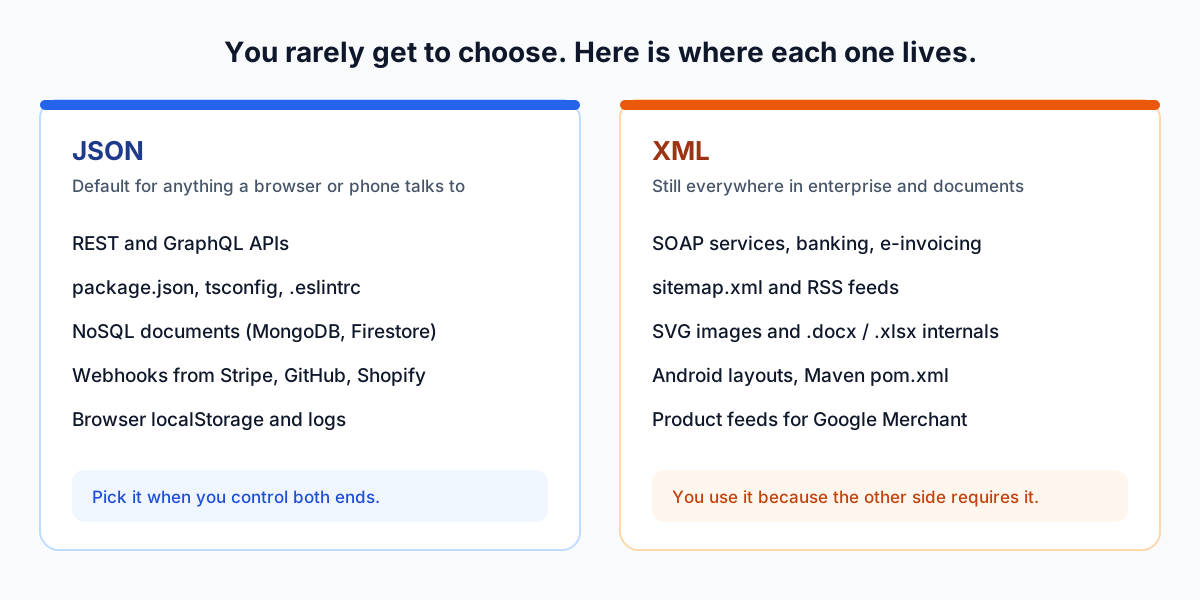
Arguments about which format is "better" miss how this plays out at work. If you are building both sides of an API, you will pick JSON and nobody will question it. If you are sending an e-invoice to a government portal, submitting a product feed to Google Merchant Center, or talking to a bank's SOAP service, the other side picked XML years ago and that is the end of the discussion.
One more thing about size: it mostly disappears once compression is involved. Our 500-order test file gzips to about 1.5 KB as JSON and 1.7 KB as XML. Repeated tag names compress extremely well. Real data is less repetitive than that test, but the point stands: choose based on who you are talking to, not on bytes.
Formatting: same bytes, different job
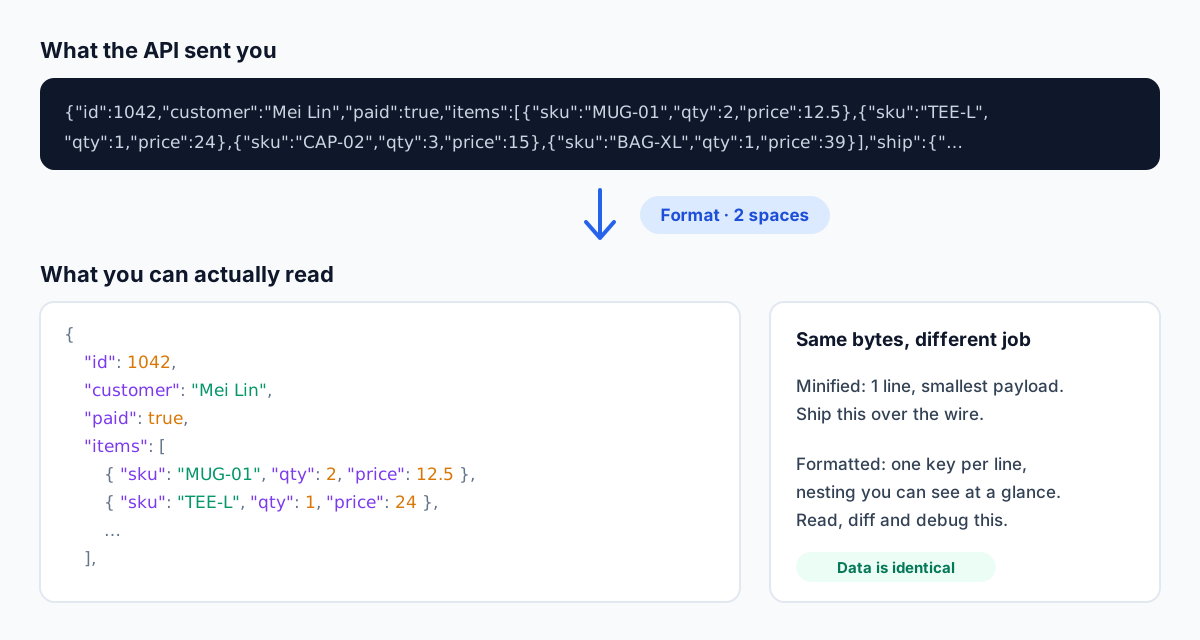
Minified and formatted JSON contain exactly the same data. Minified is for machines: no spaces, no line breaks, smallest payload. Formatted is for you: one key per line and indentation that shows what sits inside what. When an API response is wrong, the first move is always to format it. A missing field or an array that should have three items but has two is invisible on one line and obvious on twenty.
The JSON Formatter indents with two spaces and has a Minify button for the reverse trip. The XML Formatter lets you pick 2 spaces, 4 spaces or a tab, and reports how many elements and how deep the nesting goes, which is a quick sanity check on an unfamiliar feed.
One XML caveat worth knowing: in mixed content such as <p>Hello <b>world</b></p>, whitespace between tags can be part of the text. Pretty-printing a document like that for reading is fine, but send the original, not the reformatted copy, back to a system that renders it.
Reading a JSON error without guessing
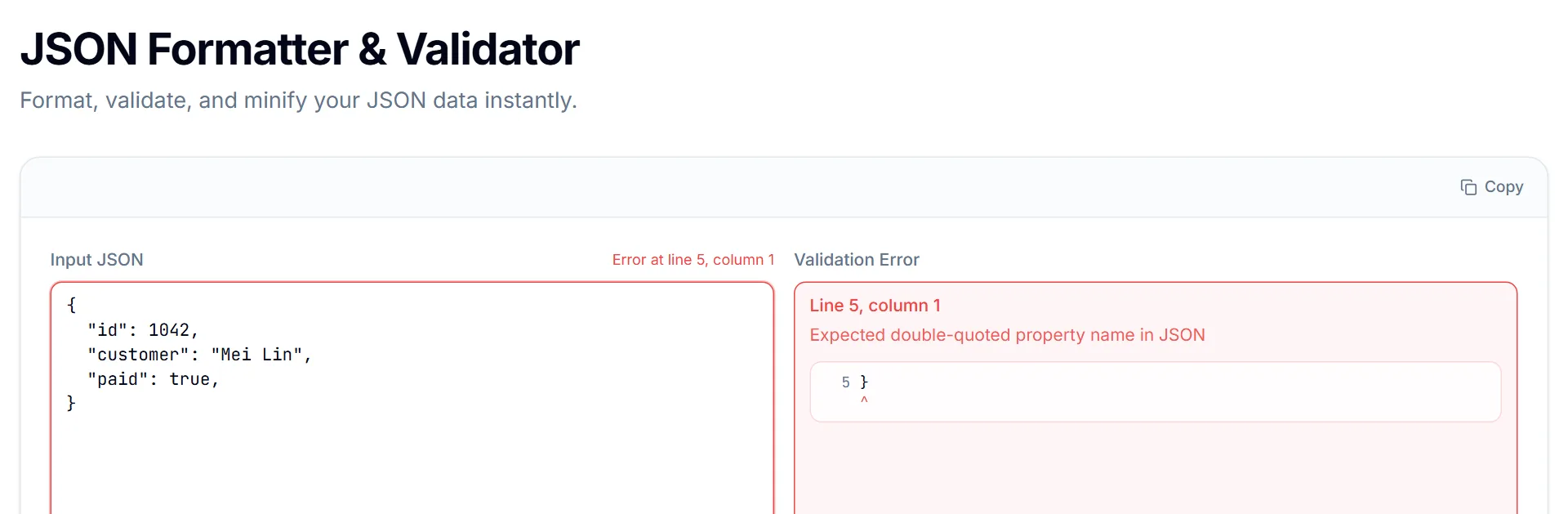
Here is the error that trips up more people than any other. Look at the snippet in the screenshot below: four lines that seem fine, and a formatter that fails at line 5, column 1, on the closing brace.
The real mistake is on line 4: the comma after true. The parser cannot know that comma is wrong until it sees } where it expected another key, so it reports where it gave up, not where you went wrong. Rule of thumb: when the caret points at something that looks fine, look one token back.
If a message ever points at line 1, column 1 for an error that is clearly further down, the browser didn't include a position in its error. Scan for the usual suspects below instead.
- Trailing comma after the last item in an object or array
- Single quotes ('name') instead of double quotes
- Unquoted keys: {name: "Mei"} is JavaScript, not JSON
- Comments: JSON has no // or /* */
- Curly "smart" quotes pasted from Word, Notion or Slack
- NaN, undefined or Infinity, which are not valid JSON values
- In XML: a bare & (write &), <Item> closed by </item>, or two root elements
Converting JSON ↔ XML: three decisions that bite
Converters work fine on simple data. The trouble starts at the three places where the formats don't line up, and each one needs a decision from you.
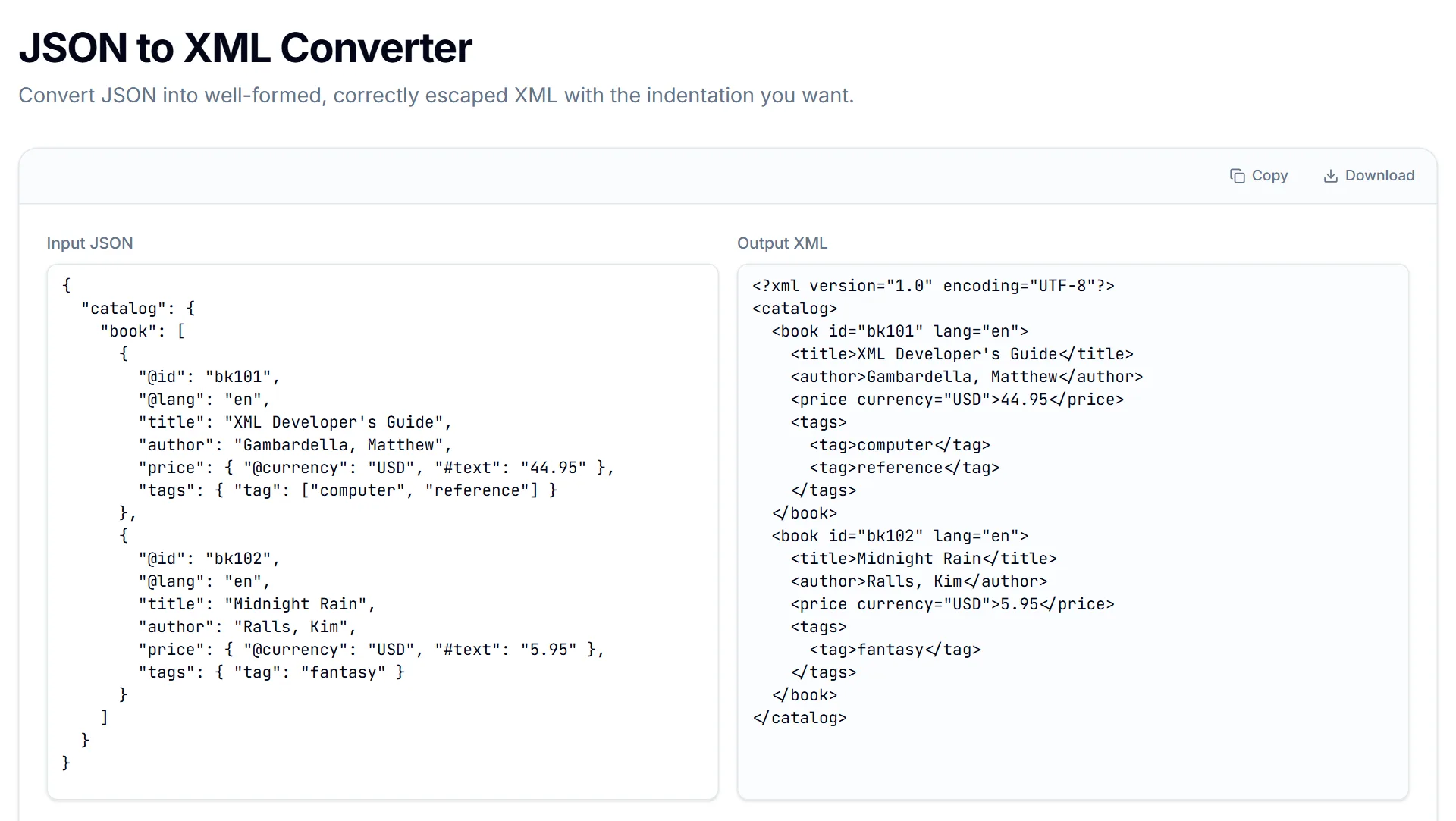
Attributes. JSON has no attributes, so converters use a convention. In the JSON to XML Converter, a key starting with @ becomes an attribute and #text becomes the element's text, so {"price": {"@currency": "USD", "#text": "44.95"}} turns into <price currency="USD">44.95</price>. Agree on the convention before two teams build against it.
Arrays. XML has no arrays, only repeated elements. Two <tag> children become a JSON array, but a single <tag> becomes a plain value, so the same field changes shape depending on the data. That breaks code that expects to loop. In the XML to JSON Converter, tick "Always use arrays for child elements" and the shape stays consistent.
Types. XML values are text. "Cast numbers & booleans" turns "42" into 42 and "true" into true, which is usually what you want, right up until a postcode like 02134 becomes 2134 or a long account number loses precision. If the data has IDs, phone numbers or postcodes, leave casting off and convert those fields yourself.
Also watch for JSON keys that aren't legal XML names. "my key" (with a space) or "2fa" (starting with a digit) cannot become elements. The converter stops and names the key instead of inventing something.
- Format the source first. A conversion of broken input only gives you a different error.
- Open JSON to XML or XML to JSON and paste, or use Load sample to see the conventions.
- Choose an indent (or Minified) and, for XML to JSON, decide on array and type casting.
- Convert, then spot-check one record with repeated children and one with attributes.
- Copy or download the result. Nothing is uploaded: the conversion runs in your browser.
Key takeaways
- The real difference is types: JSON has numbers, booleans and arrays; XML has text, attributes and namespaces.
- Format to read and debug, minify to send; the data doesn't change.
- When a JSON error looks wrong, look one token before the caret.
- Converting means deciding on attributes, arrays and type casting. Decide on purpose, not by default.
Try the related tool
Put this guide into practice with a free, private browser tool — no signup.
JSON FormatterFrequently Asked Questions
Is JSON faster than XML?
Usually, yes. JSON parsers are simpler and built into every browser. For typical API payloads the difference is small next to network time, and with gzip the size gap mostly closes.
Can JSON have comments?
No. Standard JSON doesn't allow comments. Some tools accept JSONC or JSON5 (tsconfig.json is one example), but a strict parser will reject them.
Why does my error point to the line after the mistake?
Parsers report where they stopped, not where you made the mistake. A trailing comma is only detected when the next character turns out to be } or ], so check one token before the reported position.
Is it safe to paste API responses into an online formatter?
It depends on the tool. The EazyTools4u JSON and XML tools run entirely in your browser and don't upload input, but still remove tokens or personal data before pasting into any site you don't control.